
25 Ways to Use Your Erin Condren Weekly Dashboard Page
2025–2026 Weekly Dashboard LifePlanner Setup Inspiration
Hello, PlannerKate friends! 💕
This blog post is a true labor of love. As I was looking back through my planning archive for the 2025–2026 Erin Condren Weekly Dashboard LifePlanner, I realized something… I had created SO many different ways to use that right-hand dashboard page!
I keep seeing people asking:
“What in the world do I do with that huge blank priority box?”
and…
“SIX habit trackers?! I don’t need six habits to track… what do I even put there?!”
If you’ve ever opened your Weekly Dashboard LifePlanner, stared at that right-hand page, and wondered how to make it work for you — this post is for you!
The beauty of the dashboard layout is that there is no “wrong” way to use it. That large priority section, the notes area, the habit trackers, and all those little spaces can become whatever your life needs them to be.
Today, I’m sharing 25 different Weekly Dashboard setups from my 2025–2026 planner. My goal is to give you real-life inspiration so you can see these ideas in action and decide what combination works best for your planning style.
As I started putting this post together, I quickly realized something important. You don’t have to pick just one setup. Maybe you love the priority list from one spread, the tracker idea from another, and the notes section from a third. Mix and match! Take pieces from different layouts and create a dashboard page that fits your exact needs.
Because that’s what planning is all about; creating a system that supports your life! And, of course, making it cute along the way! 😉 (Because let’s be honest… Kate doesn’t make a sticker that I don’t love using!) So grab your planner, your favorite PlannerKate stickers, and let’s dive into 25 Erin Condren Weekly Dashboard setup ideas!
SPREAD 1: JUNE 30 - JULY 6
💡dashboard kit graph sticker + 2 full box trackers
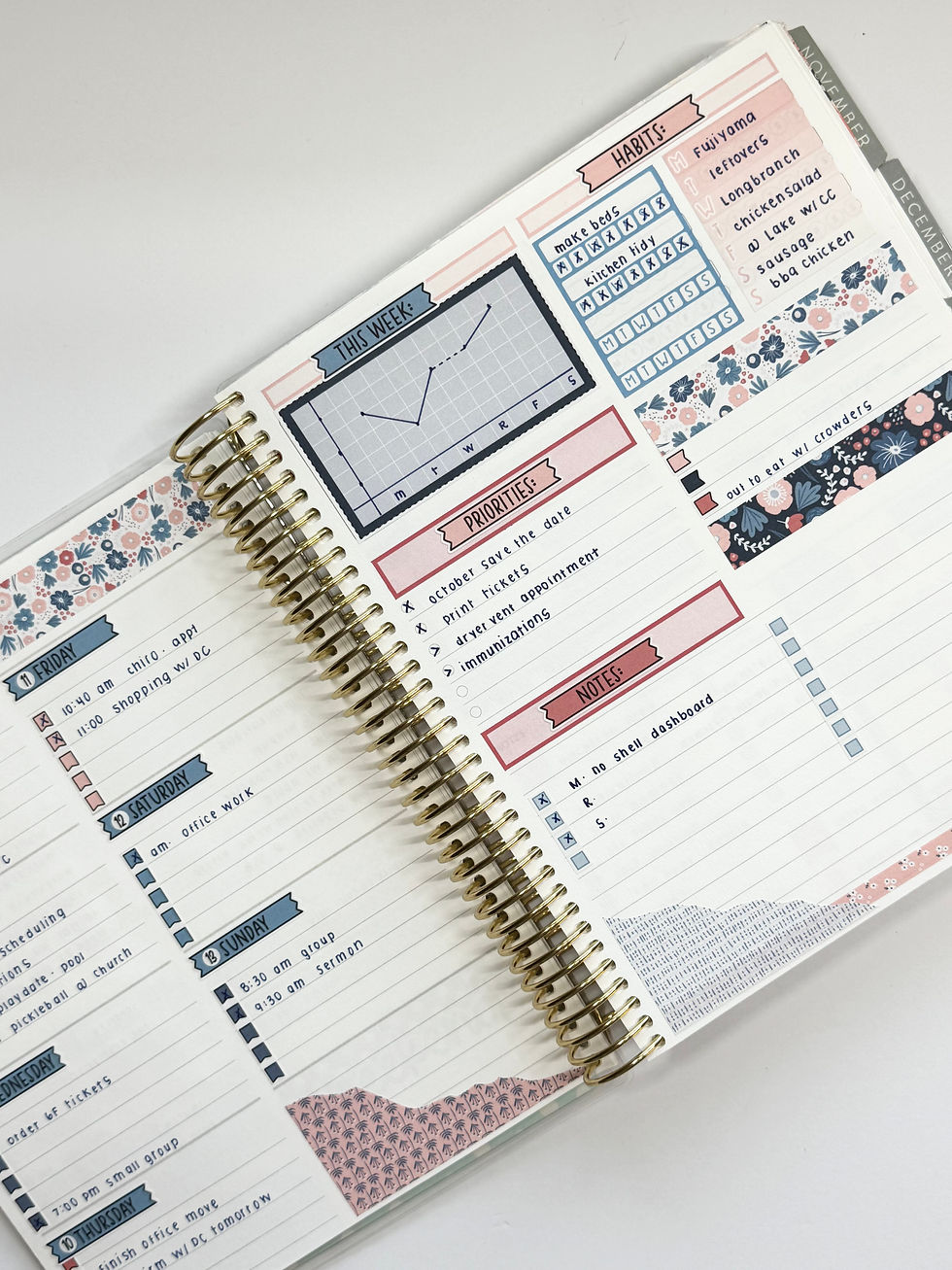
This week I paired the dashboard kit graph large box (tracking my energy level each day) with a full box habit tracker and a full box M-S tracker.
Shop all dashboard kits here:
https://www.plannerkate.com/category/ec-dashboard-planner
You can find the full boxes to match your dashboard kit in the weekly add-on section:
https://www.plannerkate.com/category/add-ons
SPREAD 2: JULY 14 - JULY 20
💡dashboard kit graph sticker + decorative full box + 3 individual habit trackers

This week I paired the dashboard kit graph large box (tracking my energy level each day) with the decorative full box from the weekly sampler sheet with 3 individual boxes from the dashboard kit.
Shop all dashboard kits here:
https://www.plannerkate.com/category/ec-dashboard-planner
Shop all samplers here:
SPREAD 3: JULY 28 - AUGUST 3
💡dashboard kit graph sticker + decorative full box + full box tracker

This week I paired the dashboard kit large graph sticker with the decorative full box from the weekly sampler sheet and 1 full box tracker.
Shop all dashboard kits here:
https://www.plannerkate.com/category/ec-dashboard-planner
Shop all samplers here:
https://www.plannerkate.com/category/weekly-samplers
You can find the full boxes to match your dashboard kit in the weekly add-on section:
SPREAD 4: SEPTEMBER 29 - OCTOBER 5
💡lined daily duo insert

For this week I decided I didn't want the sections at all and just wanted lined space.
Shop daily duo inserts here:
https://www.plannerkate.com/product-page/kit-8xx-ec-7x9-daily-duo-7x9-erin-condren-daily-duo
SPREAD 5: OCTOBER 6 - OCTOBER 12
💡4 full boxes, horizontally (2 checklists, hydrate tracker, habit tracker)

This turned out to be one of the quickest setups and one of my favorite weeks. I put down a strip of washi, 4 full boxes, then finished with another strip of washi.
Shop full box ombre boxes here:
https://www.plannerkate.com/search?q=V-26
Shop full box hydrate boxes here:
https://www.plannerkate.com/search?q=v-25
Shop full box tracker here:
SPREAD 6: OCTOBER 13 - OCTOBER 19
💡pick your favorite font and label it

Sometimes I just need a simple setup, and this week turned out to be a favorite all because of the font / script choice! I've been reaching for the Type Font lately, but you could choose any of Kate's scripts or fonts.
Shop Type Font here:
https://www.plannerkate.com/category/f7-type-font
Shop all fonts:
https://www.plannerkate.com/category/font-listings
SPREAD 7: NOVEMBER 3 - NOVEMBER 9
💡dashboard kit graph sticker + hello month sticker + labels + deco

For this spread I used the full box grid from the dashboard kit and went with a simple tracker of sorts by covering the tracker label with a dash sticker and leaving the days of the weeks open to mark off. I finished by trimming a decorative full box from the weekly sampler.
Shop all dashboard kits here:
https://www.plannerkate.com/category/ec-dashboard-planner
Shop dashed label addon here:
(You'll need AO-23 from the drop down)
https://www.plannerkate.com/category/add-ons
Shop all samplers here:
https://www.plannerkate.com/category/weekly-samplers
SPREAD 8: NOVEMBER 10 - NOVEMBER 16
💡ideal week STK + weekly to do list STK
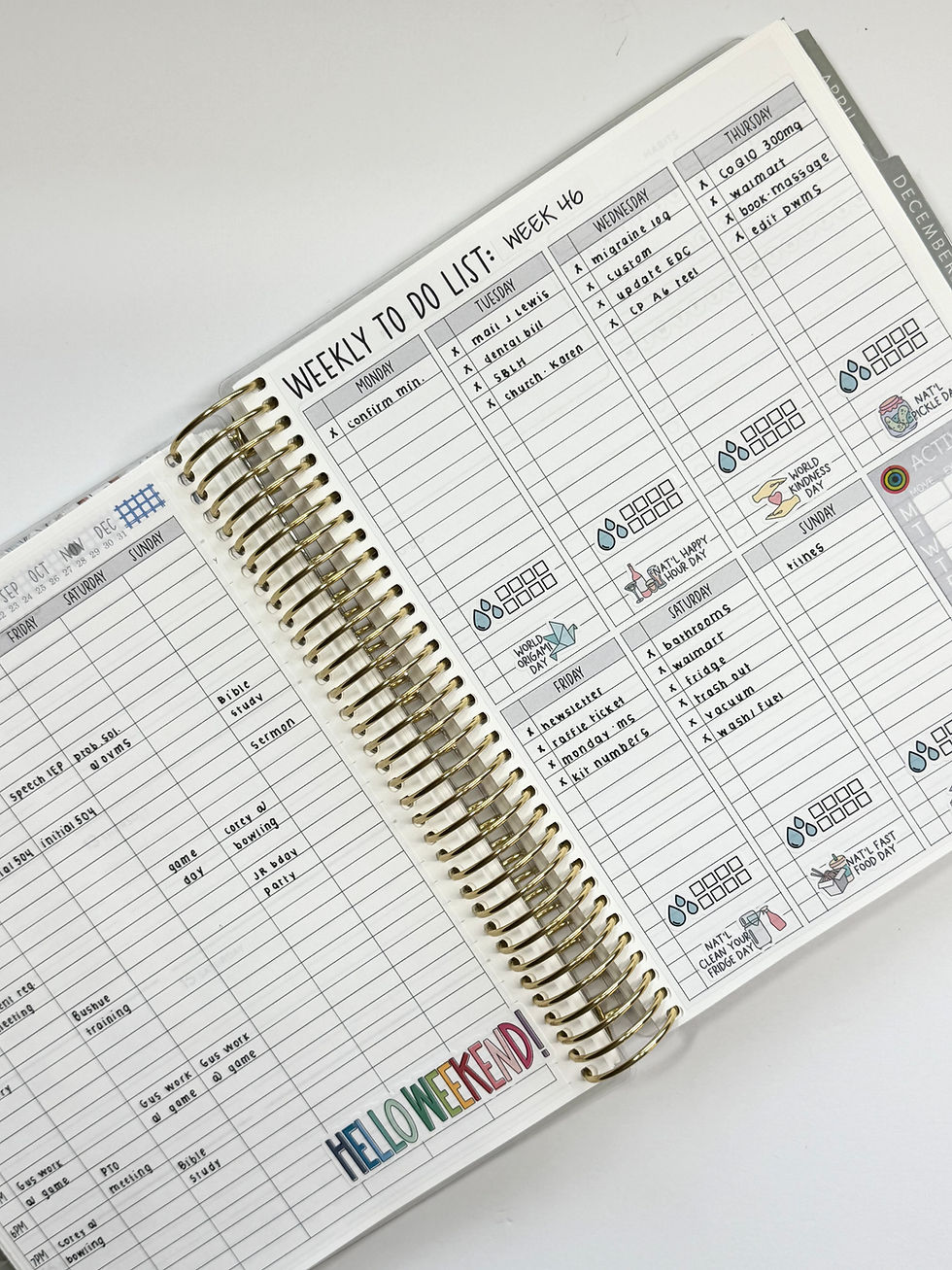
This spread is one that totally transformed my dashboard layout into an hourly layout by pairing 2 full page stickers. This option is great for when you need an hourly breakdown for just one week or two and don't want to setup a new planner! All the stickers shown are actually from the STK line.
Shop My Ideal Week:
https://www.plannerkate.com/product-page/stk-246-my-ideal-week-planning-dashboard-sticker
Shop Weekly To Do List:
https://www.plannerkate.com/product-page/stk-247-weekly-to-do-list-planning-dashboard-sticker
Shop all STK sheets:
SPREAD 9: NOVEMBER 17 -NOVEMBER 23
💡weekly to do list STK
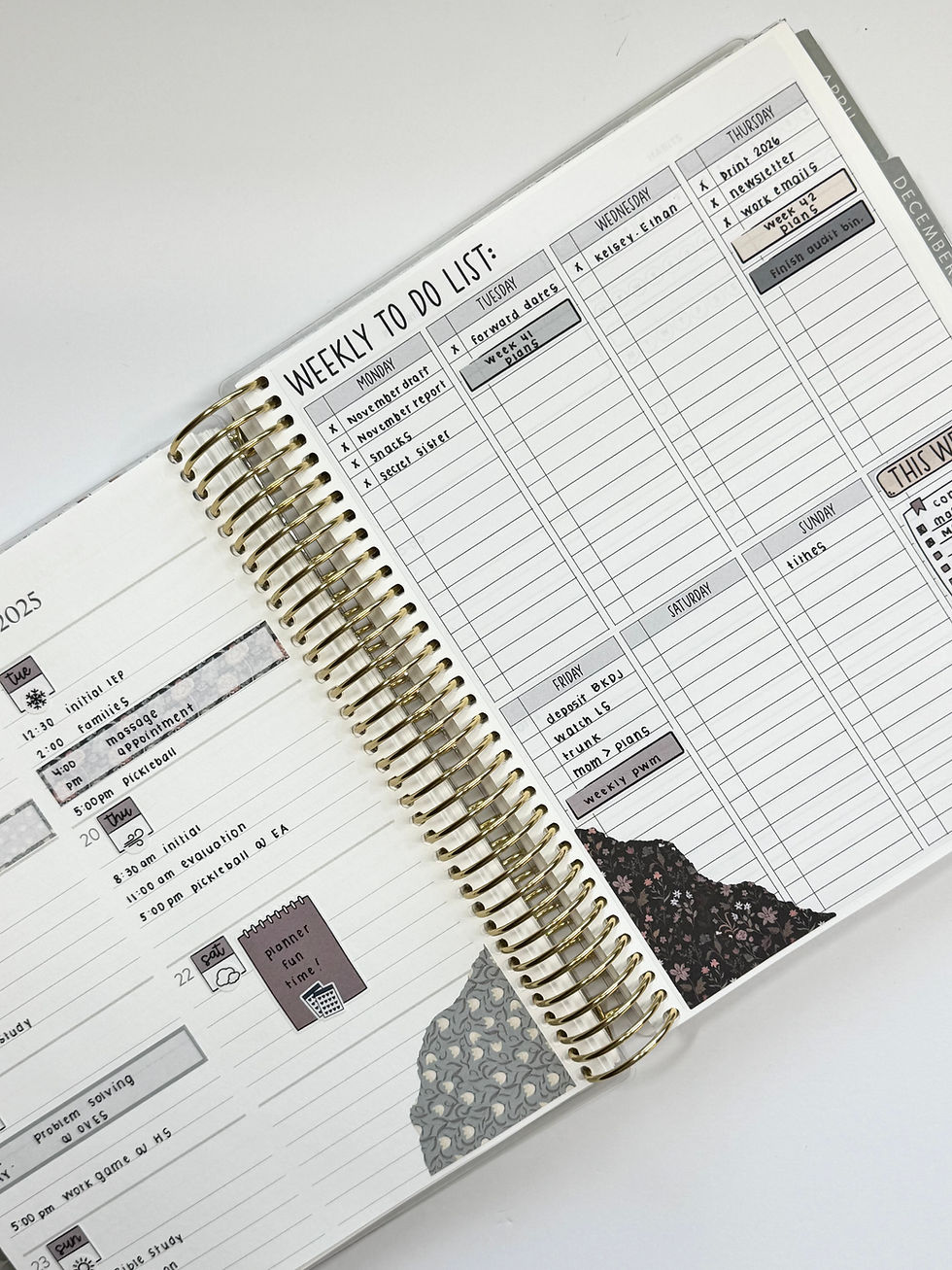
This week was similar to the previous week for the dashboard side, but I left the planning page as-is. I added journaling stickers, too.
Shop Weekly To Do List:
https://www.plannerkate.com/product-page/stk-247-weekly-to-do-list-planning-dashboard-sticker
Shop all journaling kits:
SPREAD 10: NOVEMBER 24 - NOVEMBER 30
💡washi and checklist + labels

This week was all about using stickers I had leftover from a different planner! I used only Laurel Denise Nancy stickers for this spread on both pages. Even the checklists turned sideways for a page break worked out well!
Shop all Laurel Denise Nancy kits:
SPREAD 11: DECEMBER 1 - DECEMBER 7
💡dashboard kit 2 boxes + 6 habit trackers

This week I used the dashboard kit but moved the boxes around. The large graph box moved to the left hand page and I used the two smaller boxes on the right dashboard page.
Shop all dashboard kits here:
SPREAD 12: FEBRUARY 1 - FEBRUARY 8
💡large flag + 3 full boxes (checklist, M-S tracker, habit tracker)

This spread is similar to the four full box idea above but I swapped out the full box for a full box flag.
Shop full box ombre boxes here:
https://www.plannerkate.com/search?q=V-26
Shop full box hydrate boxes here:
https://www.plannerkate.com/search?q=v-25
Shop full box tracker here:
https://www.plannerkate.com/search?q=v-23
Shop full box flags here:
SPREAD 13: FEBRUARY 9 - FEBRUARY 15
💡stacked washi and full boxes

This week was another full box week, with headers and some washi adjustment! I alternated the washi and the full box combos for a stacked look.
Shop full box ombre boxes here:
https://www.plannerkate.com/search?q=V-26
Shop full box hydrate boxes here:
https://www.plannerkate.com/search?q=v-25
Shop full box tracker here:
https://www.plannerkate.com/search?q=v-23
Shop headers here:
https://www.plannerkate.com/category/header-stickers-hdr
SPREAD 14: FEBRUARY 23 - MARCH 1
💡dashboard kit graph sticker + sidebar add-on

This week was super simple to put together. I paired the large graph box from the dashboard kit with the sidebar stackable addon.
Shop all dashboard kits here:
https://www.plannerkate.com/category/ec-dashboard-planner
Shop sidebar addon here:
(You'll need AO-14 from the drop down)
SPREAD 15: MARCH 2 - MARCH 8
💡checklist add-on with headers + daily duo checklist x2

This turned out to be another favorite! I started with a strip of washi at the top, added 4 headers to categorize my lists, added 4 full box checklists from the addon sheets, then added 2 of the bulleted daily duo inserts, and finished with another strip of washi.
Shop washi sheets:
(You'll want sheet B in from the dropdown menu)
https://www.plannerkate.com/category/weekly-samplers
Shop headers here:
https://www.plannerkate.com/category/header-stickers-hdr
Shop full box checklist addon here:
(You'll want AO-15 from the dropdown)
https://www.plannerkate.com/category/add-ons
Shop daily duo bulleted inserts:
(You'll want DD-8 from the dropdown)
https://www.plannerkate.com/category/ec-7x9-daily-duo
SPREAD 16: MARCH 9 - MARCH 15
💡vertical stacked daily duo checklists

This was a vertical approach with the bulleted daily duo insert from above. I stacked them vertically on the dashboard page leaving the habit tracker section open.
Shop daily duo bulleted inserts:
(You'll want DD-8 from the dropdown)
SPREAD 17: MARCH 16 - MARCH 22
💡BUJO only week

I really enjoyed this week because I only used one collection of stickers; the BUJO collection! It always makes the week come together so quickly when I can grab one sticker album and go.
Shop all BUJO stickers here:
SPREAD 18: MARCH 23 - MARCH 29
💡vault kit only week

This was another week that came together very quickly and it's easy on the budget! All the stickers in the spread are from a vault kit. I used the monthly and weekly elements and loved the finished product so much I'll definitely be doing it again. Plus, the vault kits let me use some of my favorite "old" designs!
Shop all vault kits:
SPREAD 19: MARCH 30 - APRIL 5
💡dashboard kit only

This week I used the dashboard kit only and mixed it up by using the large graph sticker, only one box, and leaving the 3 habit trackers I needed open.
Shop all dashboard kits here:
SPREAD 20: APRIL 6 - APRIL 12
💡DASH week
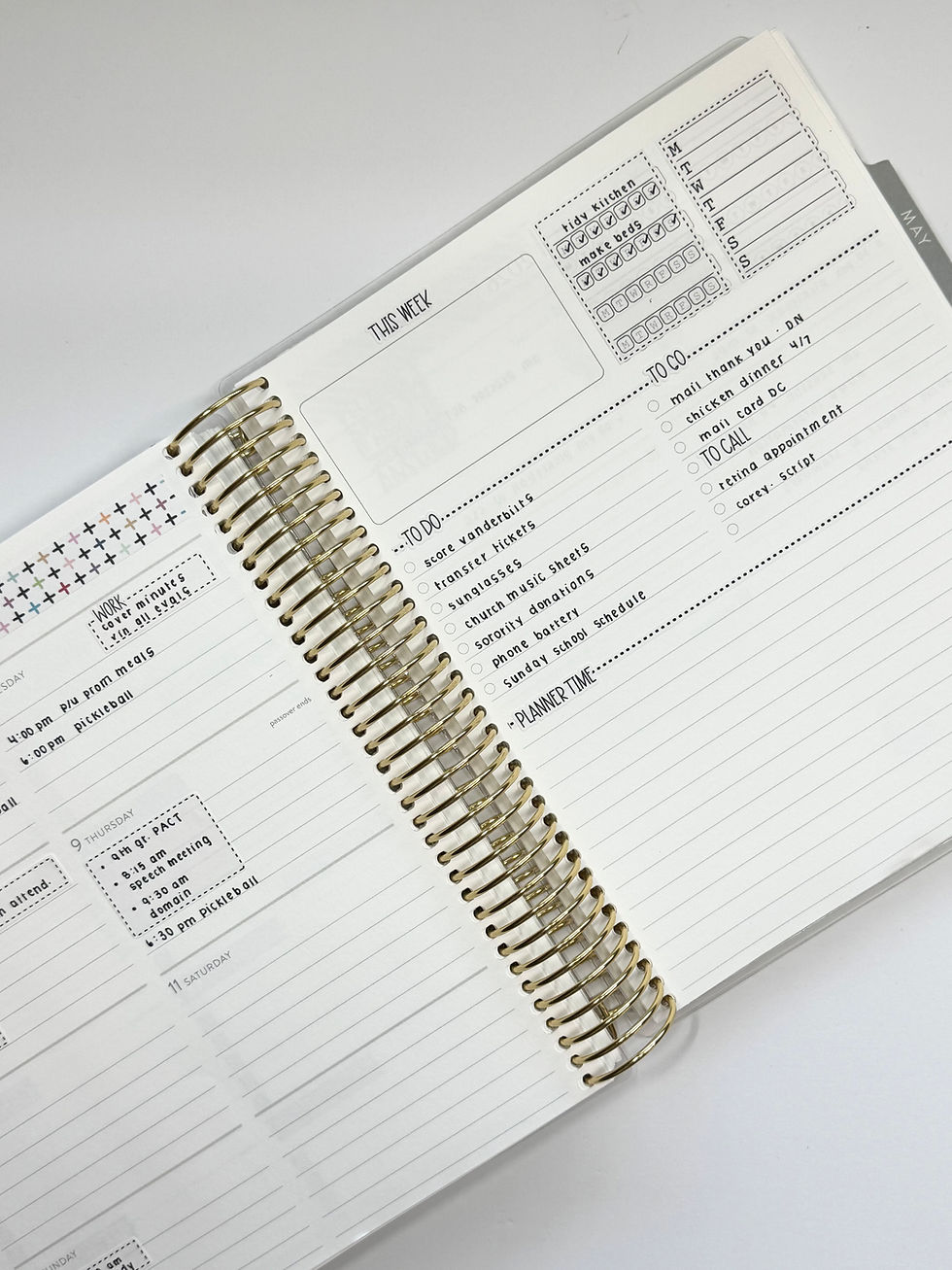
This was another "one collection" only setup! For this spread I used only DASH stickers. The dash stickers are a simple, neutral option.
Shop all DASH stickers here:
SPREAD 21: APRIL 20 - APRIL 26
💡2 Toile/Legacy 12 box stickers

This week was a Toile colorway week and I discovered the 12 planning box covers for the front of the planner worked perfectly on the dashboard page, too!
Shop 12 planning box covers:
SPREAD 22: APRIL 27 - MAY 3
💡daily duo only week (memory)

This week was another week when I wanted one kit on my desk for the entire week for simplicity sake and I used ONLY daily duo sheets. I plan to print a picture for the large box. The torn washi paired with checklists was the perfect setup.
Shop all daily duo sheets:
SPREAD 23: MAY 18 - MAY 24
💡journaling kit only week

I have grown to love the journaling kits so much that they are always a part of my monthly kit order! This entire spread was done with the journaling kit. I used little flags for the 3 habits I wanted to track and used the squiggles to mark out the other 3.
Shop journaling kits here:
SPREAD 24: JUNE 1 - JUNE 7
💡memory/picture + 2 full box habit trackers

I love this week because it captured a memory! I print my pictures at 5 x 8 cm at home. I added 2 full boxes from addon options, and I was set.
Shop full box checklist addon here:
https://www.plannerkate.com/category/add-ons
SPREAD 25: JUNE 22 - JUNE 28
💡double picture + full box checklist + full box tracker

This was another memory / picture week. Sometimes I find that I have the perfect landscape photo (like the picture above), but most of the time my photos on my camera roll are portrait oriented. This idea just pairs two portrait photos next to each other versus the one landscape photo.
Shop full box checklist addon here:
I hope this post gave you a few new ideas (💡) and helped take away some of the mystery behind that Weekly Dashboard page! Remember, there is no “perfect” way to set up your planner and the best setup is the one that works for your life right now. Try something new, mix and match your favorite pieces from these 25 ideas, and don’t be afraid to change things up from week to week.
Thank you so much for letting me share my planner pages with you and for being part of this amazing planning community. I hope these ideas inspire you to have a little fun with your dashboard and create a system that is both functional and beautiful.
Happy planning! 💕



Comments